
AI tools vs. AI workflows

Using AI on Your Own vs. Sophia

Your team already uses AI. Is it running your work, or just answering questions?

AI chat tools help one person with one task at a time. Sophia runs whole processes as layered workflows, where each workflow hands its results to the next, and your team approves the decisions that matter. Here is the difference, using one real example: finding off-market deals.

The same deal search, two ways

15 manual steps vs. one workflow chain

Using AI on your own15 steps
  1. 1You search listing sites
  2. 2Copy results to a spreadsheet
  3. 3You pull county records
  4. 4You pull loan records
  5. 5Paste it all into an AI chat
  6. 6You check the math
  7. 7You fix what it got wrong
  8. 8You dig up the owner
  9. 9Paste notes into an AI chat
  10. 10You personalize each letter
  11. 11You send and track replies
  12. 12You build the offer
  13. 13Paste terms into an AI chat
  14. 14You reformat it into your template
  15. 15Email it around for approval

Every step starts and stops with a person copying, pasting, and checking.

With Sophia

Your team only decides

Sophia searches, screens, reaches out, and drafts the letter of intent You approve

Nothing goes to an owner until your team approves it.

If my team already uses AI tools, why would we need Sophia?

Short answer

Because AI tools speed up tasks, while Sophia runs processes. A chat tool can summarize a document or draft an email, but a person still has to find the data, feed it in, check the answer, and carry it to the next step. Sophia connects those steps into layered workflows that run on their own, across many different AI models, with your team approving every decision in Microsoft Teams or Slack.

Around90%

of real estate companies are piloting AI.1

However, only5%

have achieved all of their AI goals.1

Just30–45 days

until Sophia members' first production workflows are typically live.

At a glance

Using AI on your own vs. Sophia, side by side

CapabilityAI on your ownOn your ownSophia
Helps with one-off tasksSummaries, emails, quick research, and first drafts.
Runs a whole process from start to finishNot just one step that a person has to carry to the next.
One workflow kicks off the nextA finished search starts the screening, and an approval starts the outreach.
Runs on a schedule, without anyone askingThe work is waiting for your team, not the other way around.
Pulls from many data sources at onceProperty, county, tax, and loan records, cross-referenced in one place.Only what you paste in
Not dependent on one AI modelEach step uses the best model for it, and Sophia switches when a better one arrives or one goes down.
Multiple AI models cross-check every answerSophia automatically does it through the proprietary AI Synchronization Modelâ„¢.
Approvals in Microsoft Teams or Slack, with a full audit trailA clear record of who approved what, and when.
Your firm owns the work, not one person's accountWorkflows, results, and approvals stay with the firm when people move on.
Works the same way for everyone on the teamNot dependent on who writes the best prompts.
Drafts in your firm's own templatesYour letters of intent, your format, and your standard terms.With heavy editing
Real-time scorecard in hours and dollars savedMeasured against your starting baseline.
AI model costs includedThe cost of the AI models behind Sophia is included in your membership.
Total1 of 1313 of 13
A layered workflow, step by step

Off-market sourcing: five workflows, one deal pipeline

Off-market deals don't come from one question to a chatbot. They come from searching, screening, finding the owner, reaching out, and making an offer, over and over. With Sophia, each of those is its own workflow, and each one starts the next.

1
Workflow 1: Search

Sophia searches for properties that match your buy box

On the schedule your team chooses, Sophia searches your markets by location, unit count, assessed value, ownership history, and loan details. It cross-references property, county assessor, tax, and loan records, and saves every result for your team.

Every match flows into screening →
Off-market search run
MarketsYour target markets
CriteriaYour buy box
Records cross-referencedProperty, county, tax, and loan
Next stepScreening starts automatically
Illustration.
2
Workflow 2: Screen

Every property arrives as a shortlist card

Each card shows what's sourced, what's estimated, and what's unknown, so your team knows exactly what to trust. When operating statements aren't available, Sophia estimates income, expenses, and net operating income from public market data.

Seller-motivation signals, such as long hold periods, older loans, and likely loan maturities, are called out so the right owners get attention first.

Your team decides: pursue or pass
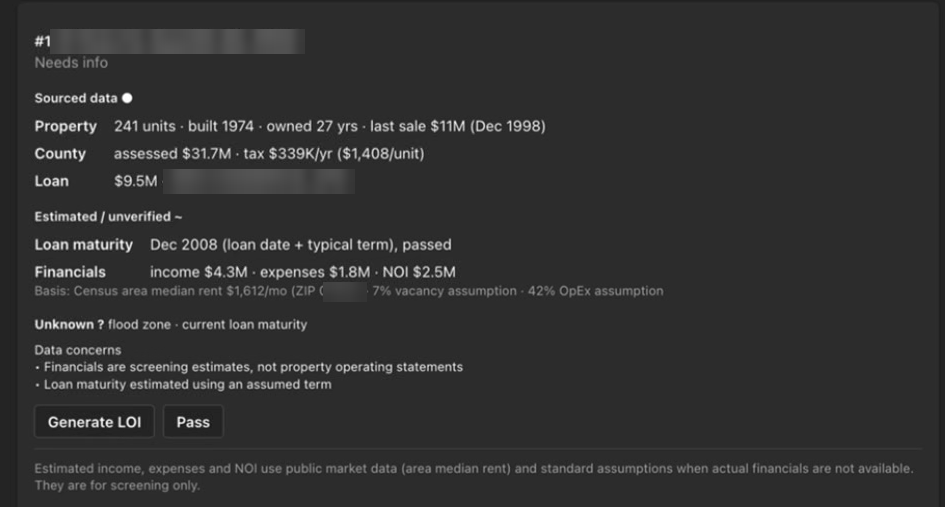
An off-market shortlist card in Microsoft Teams showing sourced property data, estimates, unknowns, and Generate LOI and Pass buttons. Property, owner, and lender details are blurred.
A real shortlist card from the Sophia platform. Property, owner, and lender details are blurred.
3
Workflow 3: Reach out

Sophia finds the owner and drafts the outreach

For every property your team wants to pursue, Sophia identifies the ownership entity behind it and drafts personalized outreach to the owner, built around what it learned in screening.

Nothing goes to an owner until your team approves it. Once approved, Sophia sends it and keeps track of who has responded.

Your team approves before anything is sent
Owner outreach ready for review
Property1420 Example Avenue
Owner of recordExample Holdings LLC
Why nowLong hold period, older loan
DraftPersonalized letter and email
ApproveEditDecline
Illustration. Your team approves, edits, or declines in Microsoft Teams or Slack.
4
Workflow 4: Offer

One click starts the letter of intent

When an owner is interested, Generate LOI opens a form that's already filled in with the property, the estimated net operating income, and the parties. Enter a cap rate or a price, and Sophia calculates the rest.

The proposed offer and standard terms are shown side by side, with unverified figures flagged before anyone submits.

Your submitted offer starts the draft →
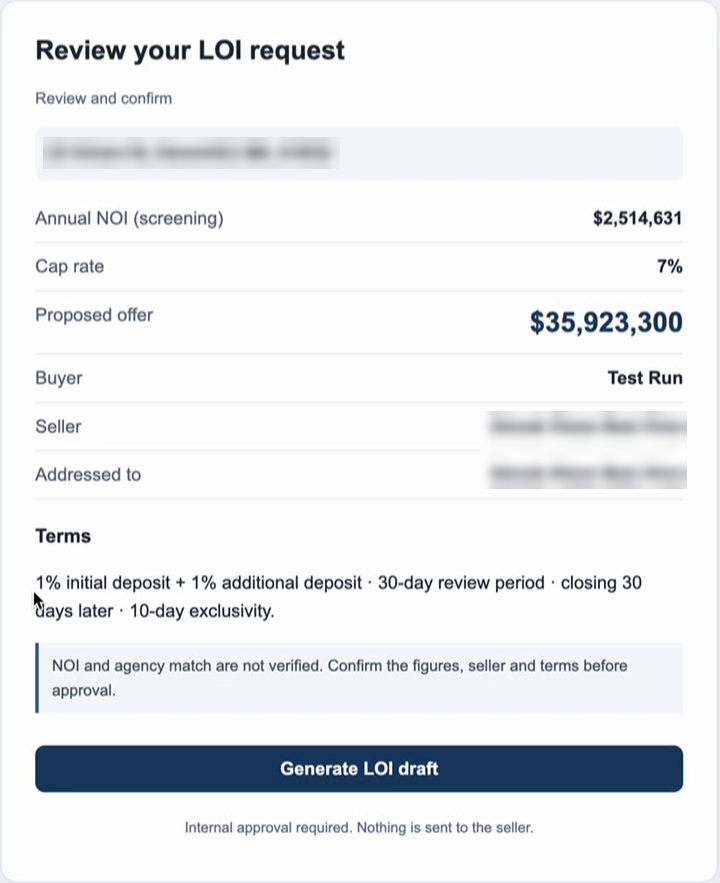
The letter of intent review screen showing the proposed offer and standard terms side by side, with unverified figures flagged. Details are blurred.
Reviewing the offer before the draft is created. Details are blurred.
5
Workflow 5: Draft and approve

A letter of intent in your firm's own template

Sophia drafts the letter of intent in your firm's Word template, with your fonts, format, and standard terms, and fills in earnest money and dates. Open items, such as a missing broker or assumed terms, are flagged before approval.

Your team approves, declines, or requests a revision in the Microsoft Teams or Slack channel they already use, and every decision is recorded.

Your team gives the final approval
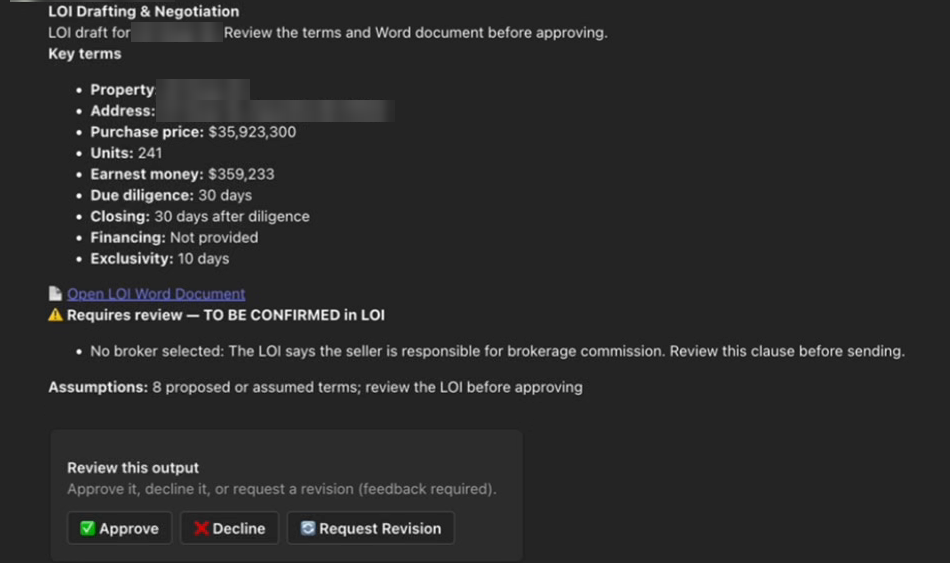
A draft letter of intent approval card showing key terms, a link to the Word document, review flags, and Approve, Decline, and Request Revision buttons. Details are blurred.
The draft, ready for approval. Details are blurred.
The same work, two ways

What off-market sourcing looks like with AI tools vs. with Sophia

AI chat tools can help with almost every row below. The difference is who does the work in between.

StepUsing AI on your ownWith Sophia
Finding propertiesAn analyst remembers to search, pulls lists from several sites, and pastes them into a spreadsheet.Runs on your schedule against your buy box, with no one having to remember.
Pulling recordsSomeone looks up county, tax, and loan records one property at a time.Property, county, tax, and loan records are cross-referenced and saved automatically.
ScreeningAn analyst pastes numbers into a chat tool and hopes the math and the facts are right.A shortlist card for each property, with sourced, estimated, and unknown figures clearly labeled.
Finding the ownerSomeone digs through entity filings to find who actually owns the property.Sophia identifies the ownership entity and brings it to the card.
OutreachEach letter or email is written, personalized, and tracked by hand.Personalized outreach is drafted for your approval, then sent and tracked.
Pricing the offerThe numbers move from the spreadsheet into a model, then into a chat window.The offer form is pre-filled. Enter a cap rate or a price.
Drafting the letter of intentA chat tool writes a generic draft that someone reformats into your template.Drafted in your firm's own Word template, with open items flagged.
Approval and recordApprovals happen in email threads and hallway conversations.Approve, decline, or request a revision in Microsoft Teams or Slack, with a full audit trail.
One model vs. many

Using one AI model for everything is a single point of failure

Most firms that use AI on their own pick one model and use it for everything. It feels efficient: one login, one tool to learn. But AI models are more like team members than software. Each one is better at some jobs than others.

  • No model is best at everything. One may lead on legal documents, another may write a sharper investment committee memo, and another may handle routine work for far less.
  • The leader changes constantly. Rankings shuffle every few weeks, sometimes weekly. The best model for your letters of intent today may not be the best one in two months.
  • One model means one point of failure. AI providers are short on computing power. Slowdowns, outages, and "you've hit your limit for today" messages are an annoyance when you're experimenting, and a real problem when your deal flow runs on it.

You'd always hire the best underwriting analyst, the best asset manager, and the best controller. Sophia treats AI models the same way. Each step of a workflow goes to the model that's best at it, the proprietary AI Synchronization Modelâ„¢ has the other models check the work, and when a better model arrives or one goes down, Sophia switches for you.

Off-market sourcing, step by step

Each step has a different best model

StepModel AModel BModel C
Cross-checking property and loan records
Estimating screening financials
Writing owner outreach
Drafting the letter of intent
Best at this step Capable, not the best

On your own with one model, at least one step always gets second-best work. With Sophia, every step gets the best model, and the others cross-check it.

Illustration. Which model is best at each task changes over time.

Everyone's own AI account

When everyone has their own AI account, your firm's best work walks out the door

Using AI on your own usually means each person has a separate account. The work gets done, but it never becomes the firm's.

  • Work lives in personal chat histories. Prompts, research, and drafts sit in individual accounts that no one else can see or search.
  • It leaves when they leave. When someone moves on, their chats, prompts, and know-how go with them, and the next person starts from zero.
  • Nothing gets shared. The best prompt in the firm helps one person. Everyone else reinvents it, and every result looks a little different.
  • No one can see what went in or came out. Rent rolls and investor details get pasted into personal accounts that leadership can't see, check, or control.
Why layering matters

A single prompt saves minutes. A chain of workflows changes how your team works.

The handoffs are where time disappears

Most of the hours in a process aren't spent on any single step. They're spent moving information between steps. Layered workflows remove those handoffs.

People decide. Sophia does the rest.

Your team approves at the checkpoints that matter, such as which deals to pursue, what goes to an owner, and what offer to make. Nothing leaves your firm without a person saying yes.

Mistakes don't flow downstream

Before a result moves to the next workflow, other AI models check it through the proprietary AI Synchronization Modelâ„¢, so an error in one layer doesn't quietly carry into the next.

Everything in one place

Mission Control shows every workflow, approval, and result, with a full audit trail and a real-time scorecard of hours and dollars saved against your starting baseline.

Beyond acquisitions

Layered workflows, built around your firm's process

Off-market sourcing is one example. Sophia builds custom workflows around how your team already works, in any part of the business where one task leads to the next.

Acquisitions
  1. Search for off-market properties
  2. Screen and score each one
  3. Your team picks the deals
  4. Owner outreach and follow-up
  5. Letter of intent for approval
Accounting
  1. Invoices arrive and are read
  2. Coded to the right property and account
  3. Routed for approval
  4. Month-end variances flagged
  5. Draft notes for your reports
Asset management
  1. Monthly property reports collected
  2. Performance compared to budget
  3. Issues flagged by property
  4. Your team reviews
  5. Draft investor update
How Sophia members get there

Learn → Automate → Scale

Your team learns AI. Sophia automates your slowest work. You scale without adding headcount.

Learn

AI Workforce Training and Upskilling

Six 90-minute interactive sessions built around your own workflows, so the AI skills your team already has turn into habits they use every day.

Automate

AI Workflow Customization

While your team trains, Sophia builds layered workflows for your slowest processes. They run on top of the systems you already use, and your team approves the results.

Scale

The Sophia platform

Mission Control shows every workflow, approval, and result. As people naturally move on, you don't have to backfill every seat, and your team takes on more properties.

"This enables our workforce to do a lot more without adding people. I would highly recommend it."
Charlie Meyer, Chief Executive Officer, Lovett Industrial
Questions

Using AI on your own vs. Sophia: frequently asked questions

We already use AI tools. Why would we need Sophia?

AI chat tools help one person with one task at a time. Someone still has to find the data, paste it in, check the answer, and carry it to the next step. Sophia runs whole processes as layered workflows, where each workflow hands its results to the next, and your team approves the key decisions in Microsoft Teams or Slack.

What is a layered workflow?

A layered workflow is a chain of AI workflows where the finished output of one starts the next. In off-market sourcing, the search workflow feeds the screening workflow, screening feeds owner outreach, and outreach feeds the letter of intent, with a person approving at each checkpoint.

Does Sophia contact property owners without our approval?

No. Sophia drafts the outreach and the letters of intent, and nothing goes to an owner or seller until someone on your team approves it in Microsoft Teams or Slack. Every approval is recorded in a full audit trail.

Can't we just build these workflows with the AI tools we already have?

You can build a single prompt or a simple automation. Chaining workflows together reliably takes connections to your data sources, error handling, approvals, an audit trail, and ongoing maintenance as AI models change. That is the work Sophia does for its members. See Building Your Own AI vs. Sophia.

What if our team only uses one AI model?

Then every task gets that model's strengths and its weaknesses. No AI model is best at everything, the leader changes every few weeks, and any single provider can slow down, go offline, or limit your usage. Sophia uses many different AI models, sends each step to the one best suited to it, and has the others check the work.

What happens to our AI work when someone leaves?

When each person uses their own AI account, their chats, prompts, and know-how usually leave with them. With Sophia, workflows belong to the firm, every result and approval is saved in Mission Control with a full audit trail, and the work keeps running when people move on.

Which AI models does Sophia use?

Sophia uses many different AI models and picks the right one for each task. Through the proprietary AI Synchronization Modelâ„¢, the models cross-check each other before results reach your team. The cost of the AI models behind Sophia is included in your membership.

Will using AI mean cutting staff?

No. Sophia members grow through attrition. As people naturally move on, you don't have to backfill every seat, and your team takes on more properties without adding people.

Sources

  1. JLL, "Real estate's AI reality check: 90% of companies piloting, only 5% achieved all AI goals", October 28, 2025.

Get started

Stop prompting. Start running your work.

See how Sophia members turn the AI their teams already use into layered workflows across acquisitions, asset management, and accounting.