
KEY TAKEAWAYS
- Chat tools speed up one task for one person. A person still carries the work from step to step, so deals, reports, and invoices keep moving at the same speed.
- The same off-market deal search takes about 15 manual steps with chat tools. As five connected AI workflows, your team only makes the decisions.
- In JLL’s 2025 survey, about 90% of real estate companies were piloting AI, but only 5% had achieved all of their AI goals.
- When everyone uses a personal AI account, the firm owns nothing. Firm-owned workflows keep the process, the approvals, and the history when people move on.
IN THIS ARTICLE
- The same deal search, two ways
- Chat tools help a person. AI workflows run a process.
- Your people have become couriers
- One AI model is a single point of failure
- When everyone has their own AI account, the firm owns nothing
- Why chaining matters more than speed
- What AI workflows look like across a commercial real estate firm
- Three questions to ask this week
- Frequently asked questions
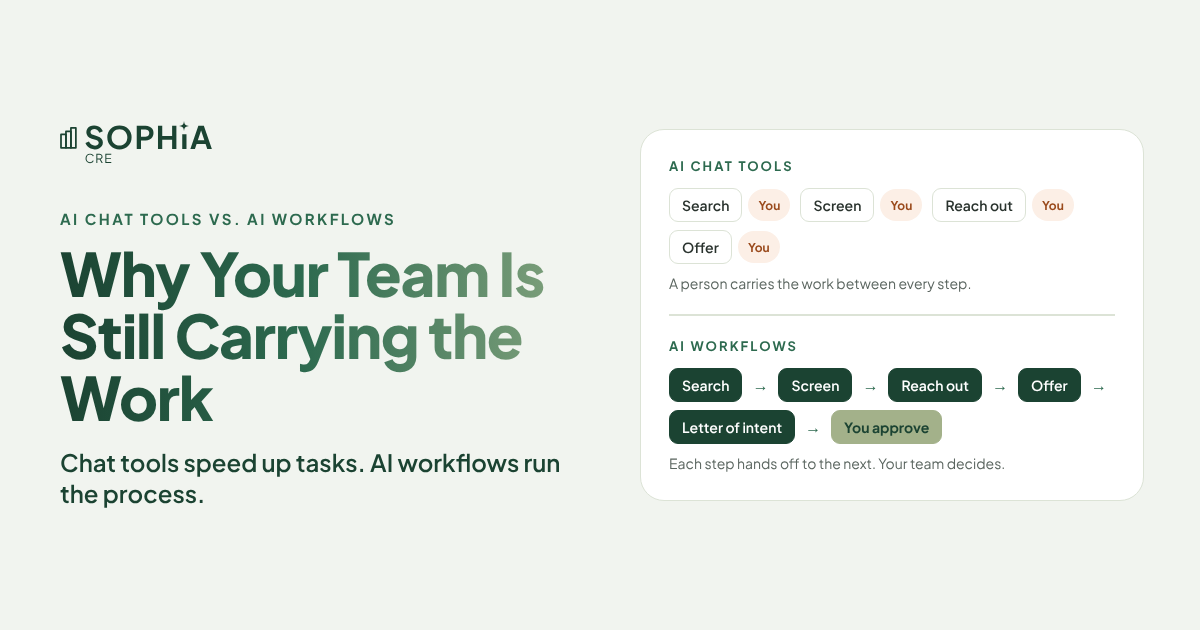
Chat tools make each task faster. AI workflows run the whole process.
Your team already uses AI every day. Yet the deals, reports, and invoices still move at the same speed, because a person is still carrying every piece of work from one step to the next. Here is why that happens, and what changes when the process runs itself.
Walk through your office today and you will find AI everywhere. An analyst is summarizing an offering memorandum. Someone in accounting is drafting a vendor email. An asset manager is cleaning up a monthly report.
That is a good start. But ask a harder question: has any of it changed how fast a deal moves from first look to letter of intent? For most firms, the honest answer is no.
The reason is simple. A chat tool helps one person with one task. Your business doesn’t run on tasks. It runs on processes, and a process is a chain of tasks with a handoff between every link.
The same deal search, two ways
Take a job every acquisitions team knows: finding off-market properties that fit your buy box and getting in front of the owners.
With chat tools, it takes about 15 separate steps. Someone searches listing sites and copies the results into a spreadsheet. Someone pulls county and loan records. They paste it all into a chat window, check the math, and fix what it got wrong. They dig up the real owner behind the LLC, personalize each letter, send it, and track replies. When an owner bites, they build the offer, paste the terms into a chat window, reformat the draft into the firm’s template, and email it around for approval.
AI helped with several of those steps. A person still started and finished every one of them.
With AI workflows, the same search runs as five connected workflows: search, screen, reach out, offer, and draft the letter of intent. Each one finishes by handing its results to the next. Your team steps in only to make decisions: which properties to pursue, what goes to an owner, what price to offer, and whether the letter of intent is ready. Nothing goes out until someone on your team approves it.
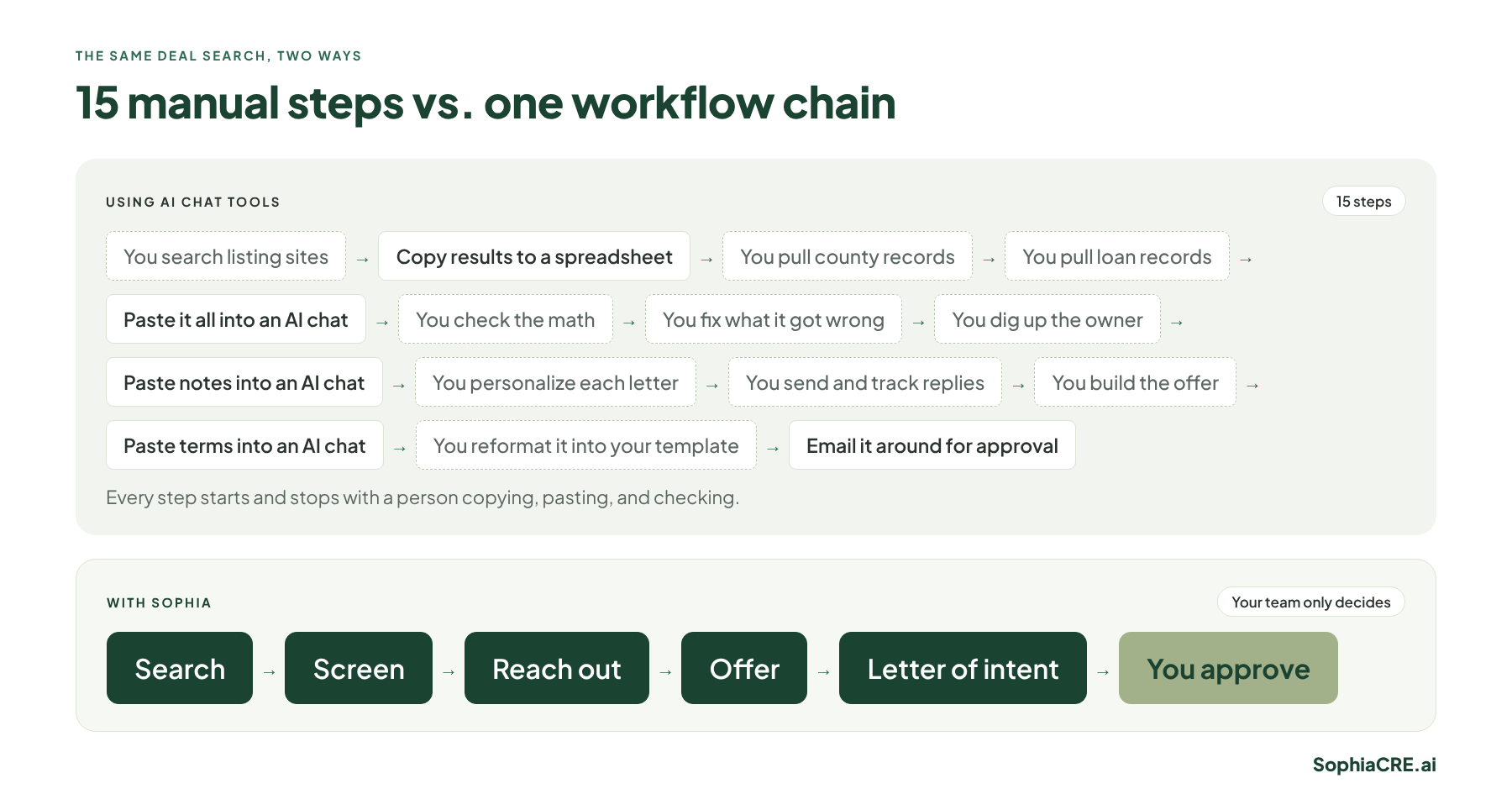
That is the whole difference. Chat tools speed up the steps. Workflows remove the handoffs.
Chat tools help a person. AI workflows run a process.
At Sophia, we call these workflows AI Co-Workers, because each one does a specific job the way a trained team member would, and then passes the work along. Here is how they compare with a chat tool:
| AI chat tool | AI workflow (AI Co-Worker) | |
|---|---|---|
| How it starts | When someone remembers to type a question | On a schedule, or when the previous workflow finishes |
| What it knows | Only what you paste in | Property, county, tax, loan, and internal records, pulled automatically |
| What happens next | A person carries the answer to the next step | The result becomes the next workflow’s starting point |
| Consistency | Depends on who writes the best prompts | Runs your firm’s steps the same way, every time |
| Record | Scattered across personal chat histories | Every result and approval logged in one place |
None of this makes chat tools bad. They are great for drafting, summarizing, and thinking through a problem. The trouble starts when a firm treats a stack of chat tool licenses as its AI strategy.
Your people have become couriers
In most commercial real estate processes, the work itself isn’t the slow part. The waiting is. A rent roll sits in someone’s inbox. A screening spreadsheet waits for the analyst who is out until Thursday. An offer waits for three people to reply to the same email thread.
Chat tools don’t fix that, because the person is still the courier. Every step ends with a human picking up the output and walking it to the next desk.
This is a big part of why so many firms stall. In JLL’s 2025 Global Real Estate Technology Survey, about 90% of real estate companies said they were piloting AI, but only 5% had achieved all of their AI goals. We covered the causes in our post on AI pilot purgatory in commercial real estate, and one of the biggest is starting with a tool instead of a process. Five tools with no workflows between them just means five more places for work to wait.
One AI model is a single point of failure
Most people who use AI on their own pick one model and use it for everything. It feels efficient. But AI models are more like team members than software: each one is better at some jobs than others, and the leader changes every few weeks.
Relying on one model creates three problems:
- Second-best work. No single model is best at reading loan documents, estimating operating expenses, and writing owner outreach. Some step always gets a weaker result.
- Confident mistakes. Every model is sometimes wrong while sounding completely sure. If nothing checks it, that error travels into every step after it.
- Downtime. AI providers are short on computing power. Slowdowns, outages, and usage limits are an annoyance when you are experimenting, and a real problem when your deal flow depends on them.
Sophia handles this with its proprietary AI Synchronization Model™. Each step of a workflow goes to the model that’s best at it, other models cross-check the result before it moves on, and when a better model arrives or one goes down, Sophia switches for you. Then a person on your team approves, edits, or rejects the work.
When everyone has their own AI account, the firm owns nothing
There is a quieter problem. When each person uses a personal AI account, the work lives in that account. The prompts that work, the research, and the know-how all stay with the person who built them.
When that person moves on, all of it leaves too. The next hire starts from zero. Leadership can’t see what went into those accounts, either, and that often includes rent rolls, tenant details, and investor information. IBM’s 2025 Cost of a Data Breach Report found that breaches at organizations with high levels of shadow AI, meaning AI tools employees use without company approval, cost about $670,000 more on average. We go deeper on these risks in the five downsides of skipping institutional AI infrastructure.
Firm-owned workflows turn that around. The process belongs to the firm and runs the same way for everyone. Every result, approval, and decision is saved in Mission Control, part of the Sophia platform, with a full audit trail. When someone moves on, the workflows keep running and the history stays. And when a lender, a limited partner, or an auditor asks what your AI did and who approved it, you have the answer.
Why chaining matters more than speed
Speed is the first thing people notice about AI. Chaining is what makes it pay.
When one workflow finishes, its result becomes the starting point for the next. The search feeds the screen. The screen feeds the owner outreach. An interested owner starts the offer, and the offer starts the letter of intent, drafted in your firm’s own template. Nobody retypes anything, and nobody has to remember where the last step stopped.
Chaining also changes how mistakes behave. In a manual process, a wrong number in step three quietly shapes every step after it. In a layered workflow, the cross-check sits between the steps, so a mismatch gets caught where it starts, before it reaches an owner, a lender, or an investor.
This is why “just give everyone a license” disappoints. A license gives each person a faster pencil. It doesn’t change who carries the paper.
What AI workflows look like across a commercial real estate firm
Off-market sourcing is one chain among many. Sophia has hundreds of layered workflows across the firm, built around how your team already works. A few examples:
- Acquisitions: off-market property search, screening and scoring, owner outreach and follow-up, and letter of intent drafts for approval.
- Asset management: monthly property reports collected, performance compared to budget, issues flagged by property, and a draft investor update.
- Accounting: invoices read, coded to the right property and account, and routed for approval, with month-end variances flagged.
- Leasing: fast answers to renter inquiries at any hour, follow-up, and applications moved forward.
- Investor relations: reports and updates drafted for your team to review.
In every case, the work runs on top of the systems you already use, and your team approves the results in Microsoft Teams or Slack. You can see the full off-market example, step by step, on our Using AI on Your Own vs. Sophia page.
This is how Sophia members get there: Learn → Automate → Scale. Your team learns AI. Sophia automates your slowest work. You scale without adding headcount.
Three questions to ask this week
- Who carries the work from step to step in your most important process? If the answer is a person, you have a tool, not a workflow.
- What happens to your team’s best AI work when the person who built it leaves?
- Could you show a lender or a limited partner exactly what your AI did last month, and who approved it?
If any answer makes you uncomfortable, that is where to start. Pick the process that is slowest and most repeated, map its steps, and mark the few places where a person truly needs to decide.
Your team should still make the calls that need judgment: which deals to chase, which tenants to keep, and what to tell an investor. AI workflows handle the searching, the copying, and the checking that used to fill the day. That is the shift worth making. Not more AI, but AI that finishes the job, with your people at the checkpoints where their judgment counts.
Frequently asked questions
What is an AI workflow in commercial real estate?
It is a set of connected steps that runs a business process, such as screening a deal or coding an invoice, from start to finish. Each step hands its result to the next, AI models cross-check the work, and a person approves the decisions that matter. At Sophia, we call these AI Co-Workers.
If my team already uses AI chat tools, why would we need workflows?
Chat tools speed up individual tasks, but a person still has to find the data, paste it in, check the answer, and carry it to the next step. Workflows connect those steps so the work moves on its own and your team only decides.
Do AI workflows replace my team?
No. Your people approve, edit, or reject every consequential result. Over time, as people naturally move on, many firms find they don’t need to backfill every seat, so they grow through attrition, not layoffs. We cover how in AI Without Layoffs.
Do we have to change our systems?
No. Sophia’s workflows run on top of the systems you already use, and your team approves results in Microsoft Teams or Slack.
How long does it take to get the first workflows live?
Sophia members typically see their first production workflows live 30 to 45 days after kickoff. While your team goes through AI training, Sophia builds your custom workflows.
Sources
- JLL, “Real estate’s AI reality check: 90% of companies piloting, only 5% achieved all AI goals,” October 28, 2025 (2025 Global Real Estate Technology Survey). Link
- IBM, Cost of a Data Breach Report 2025 (high levels of shadow AI added about $670,000 to the average breach cost). Link
Stop prompting. Start running your work.
See how Sophia members turn the AI their teams already use into layered workflows across acquisitions, asset management, and accounting.
Learn → Automate → Scale. Your team learns AI. Sophia automates the rest.